Most organizations struggle with a familiar problem: their best practices live in someone's head, buried in Slack threads, or scattered across documentation that quickly goes stale. When that expert is unavailable, projects stall. When they leave, institutional knowledge walks out the door.
When Anthropic introduced Skills for Claude Code, a system that lets AI agents autonomously access specialized knowledge based on context, we saw a way to make expertise reproducible.
Skills work like this: instead of requiring users to invoke specific commands, Claude evaluates each task and automatically pulls in relevant domain knowledge from curated markdown files. It's the difference between giving someone a manual and giving them an expert who knows exactly which page they need.
At Hedgineer, we've systematized this into a knowledge distribution layer across our entire technical workflow. Here's what that looks like in practice.
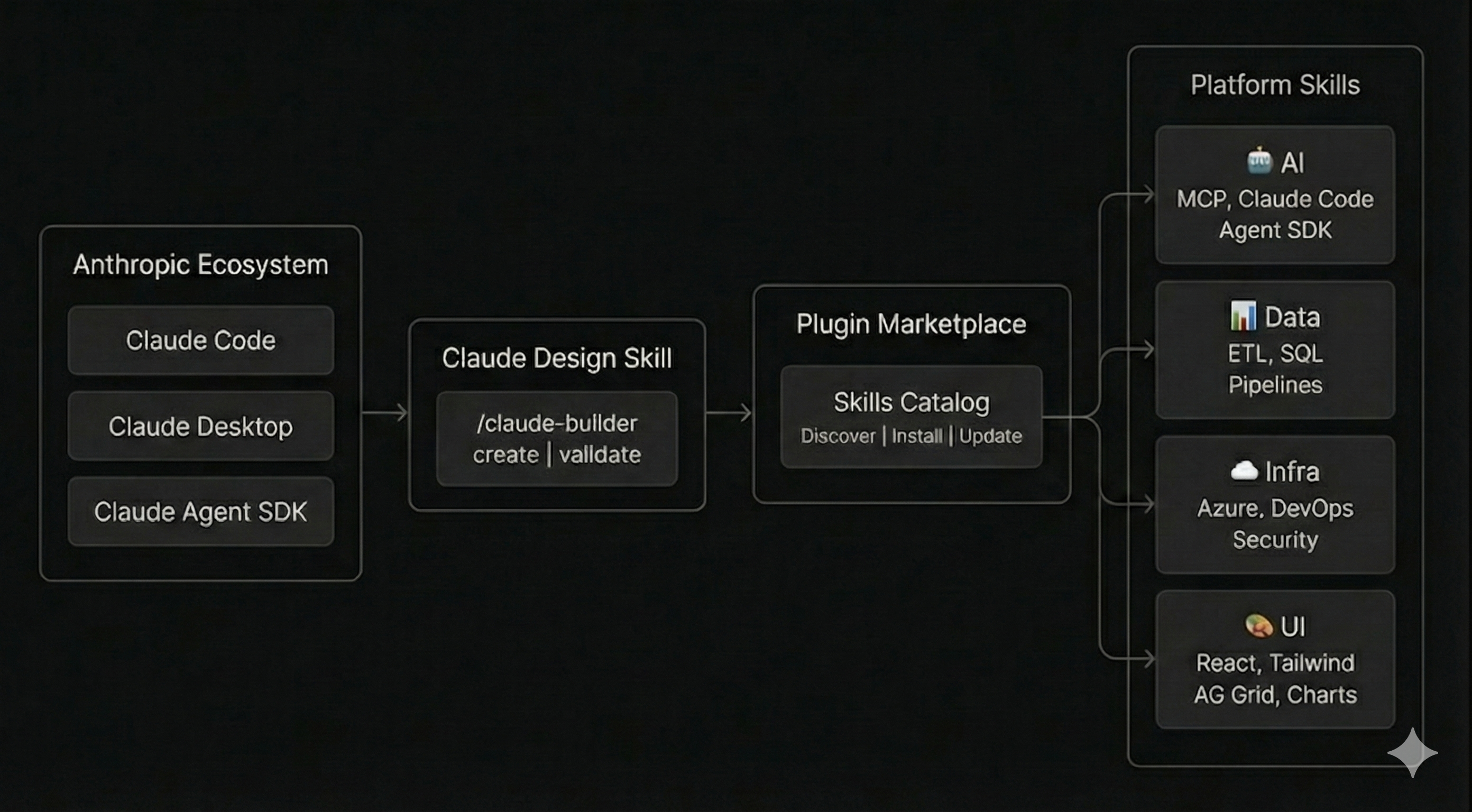
Platform Verticals
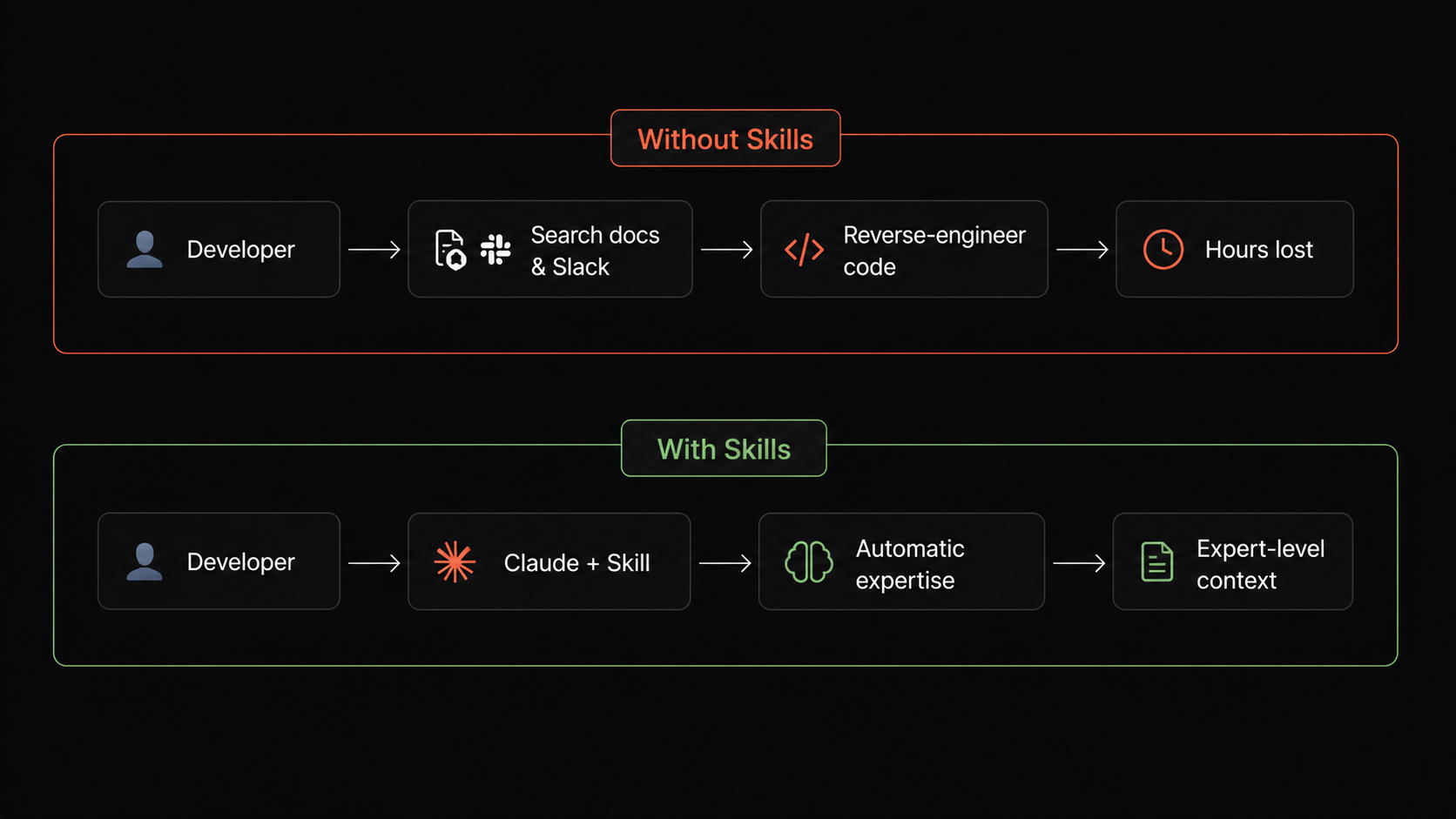
Consider what happens when a data engineer needs to build a new pipeline. Without Skills, they'd search Confluence, ping senior engineers on Slack, or reverse-engineer existing code. With Skills, Claude automatically applies our established patterns for data transformation, query optimization, and pipeline architecture the moment they start writing code.
We've organized this knowledge into seven domains, each owned by the teams closest to the problems:
| Area | Components | Knowledge |
|---|---|---|
| ai | MCP, Claude Code, Agent SDK, prompt engineering | Agent patterns, tool integration, prompt design |
| analytics | metrics, dashboards, KPI frameworks | Aggregation logic, visualization patterns, reporting standards |
| business | sales, ops, GTM playbooks | Customer workflows, internal processes, deal motions |
| data-platform | ETL, SQL, pipelines, lakehouse | Schemas, transformations, data quality, warehousing |
| infrastructure | Azure, IaC, DevOps, security | Cloud configs, deployment patterns, security policies |
| research | technical investigation, vendor evaluation | Investigative methodology, comparison frameworks, due diligence |
| ui | React, Tailwind/shadcn, AG Grid, lightweight-charts | Component design, data grids, charting, design system |
The Distribution Flow
Each team uses Hedgineer's expert skills starting with our claude-design to create and validate Skills, then publishes them to our internal Hedgineer Marketplace, a catalog where teams discover and install relevant expertise.
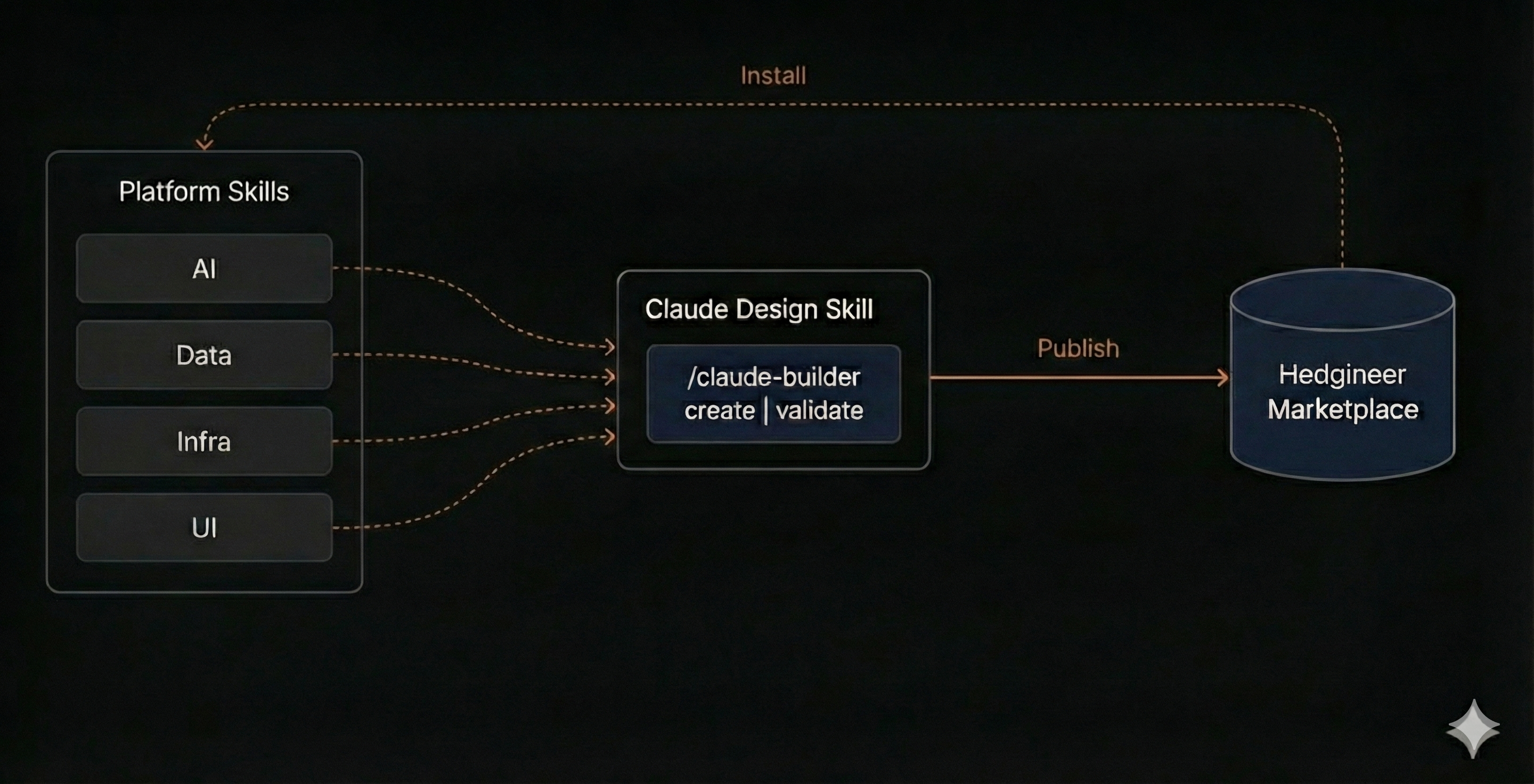
Sitting alongside the Skill Creator is our Usage Analytics MCP, which streams OpenTelemetry from every session where a Skill is invoked: which Skills triggered, on what tasks, with what outcomes. That telemetry closes the loop. Skill authors see real usage instead of guessing, edge cases surface before they turn into incidents, and underperforming Skills get rewritten based on evidence rather than gut feel.
The same engineers who build features are responsible for encoding their patterns into Skills, creating a virtuous cycle where domain experts directly contribute to the knowledge layer. Teams then consume these Skills through Claude's plugin marketplace system, installing relevant expertise packages directly into their development environment for seamless access.
The key insight: Skills are model-invoked, not user-invoked. Claude reads the Skill description and decides when it's relevant. This means engineers don't need to know what Skills exist; Claude applies the right expertise automatically.
What a Plugin Carries
Skills are the headline, but a marketplace plugin packages much more than that. Each plugin in the Hedgineer Marketplace can bundle:
| Component | Path | What it does |
|---|---|---|
| Skills | skills/ | Model-invoked expertise Claude pulls in based on context (the focus of this post). |
| Slash commands | commands/ | User-invoked shortcuts for repetitive flows like /migrate or /release. |
| Subagents | agents/ | Specialized agents Claude delegates to automatically: a code reviewer, a data-quality validator, a security auditor. |
| Hooks | hooks/hooks.json | Event handlers firing on SessionStart, PostToolUse, FileChanged, and other lifecycle events. We use them for guardrails, audit logging, and downstream automation. |
| MCP servers | .mcp.json | Model Context Protocol servers shipped with the plugin. Our Usage Analytics MCP is distributed this way, automatically wired into every session that installs it. |
| LSP servers | .lsp.json | Language server configurations so Claude gets go-to-definition, references, and hover info inside the plugin's scope. |
| Monitors | monitors/monitors.json | Background processes whose output streams into the session as notifications: CI watchers, deploy probes, log tails. |
| Output styles, status lines, themes | output-styles/, themes/ | Terminal feedback and branding that make a plugin feel like part of the team's environment. |
| Executables | bin/ | Binaries added to the Bash tool's PATH so Claude can invoke domain-specific CLIs directly. |
Bundling all of this in a single installable unit changes the calculus. A team installing the data-platform plugin doesn't just get Skills. They get the validators, the audit hooks, the MCP servers, and the CLIs that the data team uses every day. The expertise arrives with the tooling already wired in.
Governing Who Gets What
Once plugins package this much, distribution becomes a governance question rather than a publishing one. We control it from Claude Organization Settings, where the Hedgineer marketplace appears as a single GitHub-synced source and every plugin in it can be assigned to specific member groups.
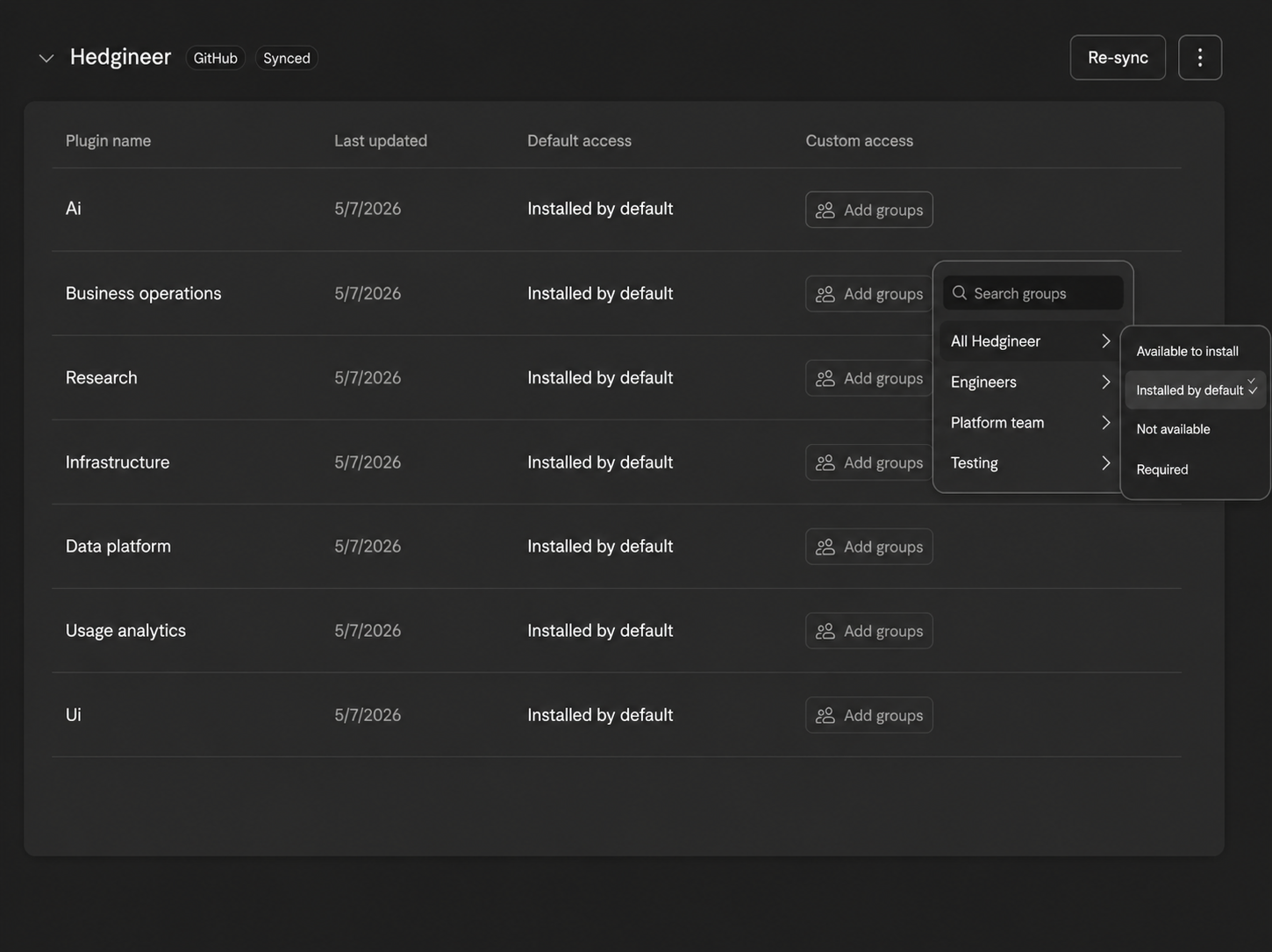
Each plugin has a default access level for the whole org and custom access rules per group (Engineers, Platform team, Testing, All Hedgineer). For any group we can set one of four states:
- Available to install: visible in the catalog, opt-in.
- Installed by default: pre-installed for that group, removable.
- Required: pre-installed and locked; useful for security baselines and audit hooks that must run for everyone.
- Not available: hidden entirely from that group.
This lets us match plugin distribution to actual responsibilities. The infrastructure plugin is required for the Platform team but only available-to-install for everyone else. Usage analytics is installed by default org-wide so we get telemetry from the start. Experimental plugins ship to the Testing group first and graduate to broader access once they prove out. Governance happens once at the marketplace level instead of being negotiated session by session.
What Makes a Good Skill
After months of iteration, we've found that effective Skills share six characteristics:
Precise triggers help Claude know when to activate. The description field has a tight budget and gets truncated dynamically, so we lead with the use case in keyword-first form. "Use this for React components" is too broad. "Use this when creating data-heavy table views with filtering and export" works.
Progressive detail keeps SKILL.md under ~500 lines and scannable. Deeper guidance lives in references/, runnable utilities in scripts/, and templates or sample data in assets/. Claude pulls them in only when the task warrants it.
Strong directives matter. "Consider using error boundaries" gets ignored. "MUST implement error boundaries for all data-fetching components" gets applied.
Validation checkpoints prevent partial implementations. Checkboxes force Claude to confirm each step before proceeding.
Invocation control & permissions matter as Skills proliferate. Frontmatter flags like disable-model-invocation (a skill only the user can fire, useful for deploys and sends) and user-invocable: false (a skill Claude pulls in silently for context, never as an action) prevent accidental invocations. allowed-tools: Bash(git *) pre-approves the tools a Skill needs so it doesn't trip permission prompts mid-flow.
Bundled resources put scripts, templates, and example code directly in the Skill folder rather than linking elsewhere.
Each domain team runs a continuous feedback loop: monitoring how Skills perform in real work, collecting edge cases, and updating based on new patterns. This maintenance cost is real, but far cheaper than watching knowledge drift across a growing team.
The Result
As we push adoption further, we're noticing something amazing. It's not just that junior engineers work faster or code quality improved. It's that expertise travels.
A front-end developer working on financial charts now applies data pipeline thinking from Skills written by our data team. An infrastructure engineer building a new service automatically implements error handling patterns our AI team discovered through production incidents.
Knowledge doesn't stay in silos. It flows through Claude to whoever needs it, exactly when they need it. In an AI-augmented organization, your best practices don't scale linearly with headcounts. They scale with how well you've encoded them.
But it goes deeper than just developer-to-skill communication. Skills can reference and build upon each other, creating a network of expertise where Claude pulls context from multiple domains simultaneously. A frontend task might trigger UI Skills that then reference Data Skills for optimal query patterns, which in turn consult Infrastructure
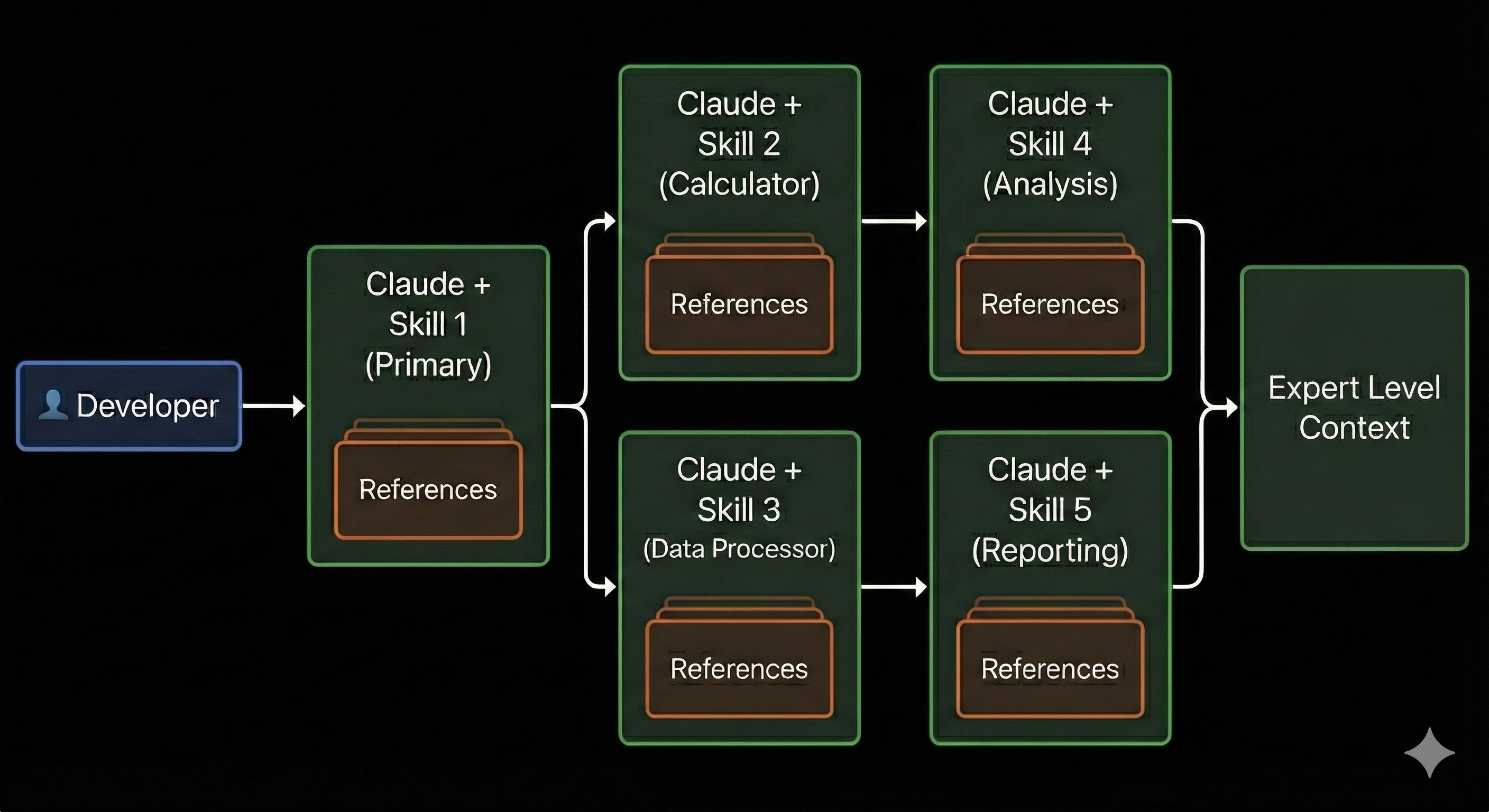
Skills for deployment considerations, all happening automatically to deliver the richest possible context for the work at hand.
What we're really building here is the best context engineering system possible for our business, ensuring that every development task has access to exactly the right combination of institutional knowledge at exactly the right moment.
Interested in what we're building? We're continuing to push the boundaries of AI-augmented development at Hedgineer. If you'd like to learn more about our approach or discuss how these patterns could work for your team, reach out to us.